
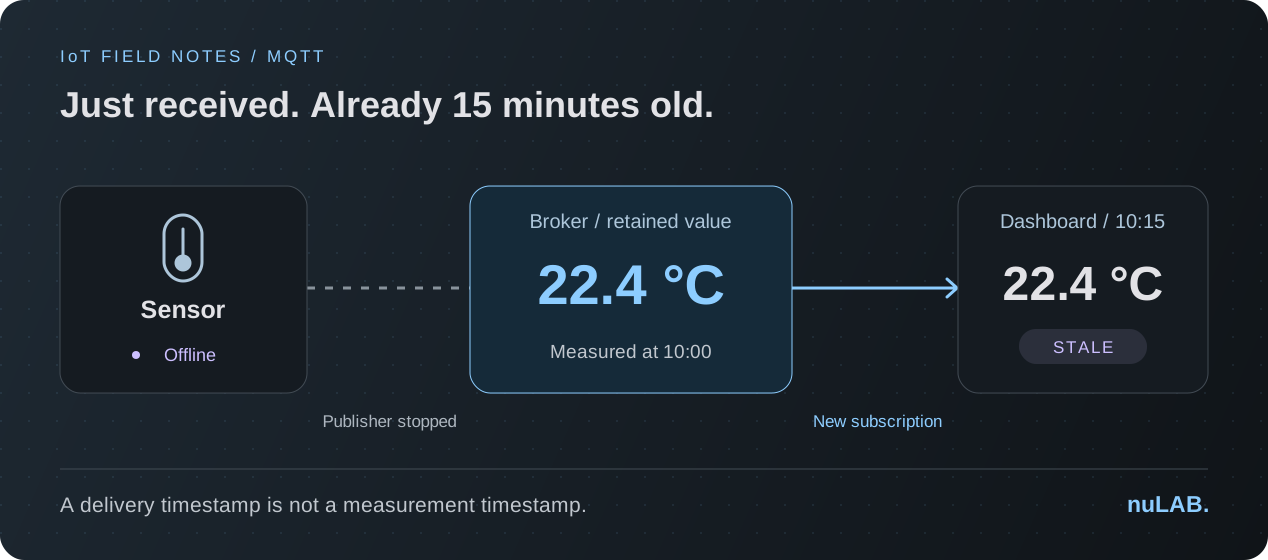
One number, two very different stories
Imagine a room sensor that takes a reading at 10:00. A few minutes later it loses power. At 10:15, you open a dashboard and see 22.4 °C. Did the sensor recover? Is the dashboard showing an old value? The number alone cannot answer either question.
The interesting part is that a newly received message can contain an old measurement. Your first debugging question should be: where did this value come from, and what does its timestamp actually describe?
The broker can remember a reading
MQTT retention lets a broker keep a message for a topic and send it to a new matching subscriber. It gives a late-arriving dashboard a starting value. Receiving that value does not establish that the original publisher is still connected.
Retention is not a measurement history. In MQTT 3.1.1, a non-retained publication does not replace or clear an existing retained value. That can explain why an established subscriber and a newly subscribing dashboard initially see different readings.
Try the late-subscriber experiment
Use an isolated MQTT 5 lab with a broker that supports retention, a publisher, and a fresh subscriber. Use QoS 1, no message expiry, a normal non-shared subscription, and Retain Handling 0. The following is an exercise to run and observe, not a recorded nuLAB test.
- Choose an unused topic, such as lab/room-a/temperature. Publish 22.4 with retention enabled. Wait for a successful QoS 1 acknowledgement before continuing.
- Stop the publisher. Leave the broker running.
- Connect the fresh subscriber and subscribe to that exact topic. Look for the stored reading and record its RETAIN flag.
- Reconnect the publisher. Clear the retained value with a retained publication whose payload contains zero bytes, and wait for a successful acknowledgement. The text “null”, “0”, and an empty JSON object are not zero-byte payloads.
- Subscribe again using another fresh client. With no further publications, the cleared reading should no longer be delivered.
Give your dashboard three clocks
For this example, design the display around three separate questions. When was the value measured? When did this dashboard receive it? When did the application last have evidence of device activity? Keep those fields separate in your data model, logs, and interface.
| Field | Example | What the reader learns |
|---|---|---|
| Measured at | 10:00 | The observation is already 15 minutes old. |
| Received at | 10:15 | The dashboard received it just now. |
| Last device activity | 10:02 | Activity was observed then; current status needs a separate check. |
{
  "value": 22.4,
  "unit": "C",
  "measuredAt": "2026-10-01T10:00:00Z",
  "sequence": 184
}
Make stale data look stale
For our room-temperature example, choose a teaching rule: a reading older than two minutes is stale. That threshold is an application choice, not a universal IoT recommendation. A building sensor and a fast control loop need different decisions.
At 10:15, show “22.4 °C · measured 15 minutes ago · stale”. Keep the last known value useful, but stop presenting it as a fresh observation. Do not turn the tile green simply because a message arrived, or change its measurement time to the dashboard's receipt time.
Check the clocks too. If a sensor timestamp is missing, implausibly in the future, or cannot be trusted, show “measurement time unknown”. A sequence number can help you spot repeated or out-of-order observations, but it needs a documented restart policy. It is not a clock.
- Show the measurement age beside the value, including units.
- Use a text label as well as color for fresh, stale, and unknown states.
- Keep connection status separate from the age of the last measurement.
- Define how missing timestamps and device restarts affect the display.
Expiry helps delivery; your UI still needs an age rule
MQTT 5 adds Message Expiry Interval to limit a message's lifetime. Expiry does not remove a value an application has already displayed. Your dashboard still needs its own freshness logic.
Test that distinction explicitly: let the dashboard receive a value, stop new readings, and wait past your chosen age threshold. The useful assertion is that the displayed state changes to stale even when no new message arrives.
Bring the question into your next lab
Start by drawing the sensor → broker → subscriber path. Then label the state each participant owns. That sketch makes it easier to distinguish a connectivity problem from an application displaying old information.
nuLAB's IoT labs let you explore simulated messaging paths. Check your selected profile and current release before attempting the retention exercise: the MQTT 5 options above are protocol concepts, not a claim that every option is available in nuLAB. Use an environment with the required controls for the full experiment.
A useful finish is an evidence note with two observations: what the subscriber received, and what the interface told its reader. A message delivered successfully can still tell an incomplete story.