Define the question before building
Question: can two hosts on different subnets exchange ICMP echo traffic when both routers have the required routes, and what changes when one return route is removed? Use two router profiles and two endpoints that support interface addressing, static IPv4 routes, route inspection, and ping. Confirm those capabilities in your selected environment first.
This is an exercise specification, not a report of an executed nuLAB test. The results below are predictions for the stated setup. Record your actual output, including failures or unsupported operations; do not replace observations with the expected answer.
Build the smallest useful topology
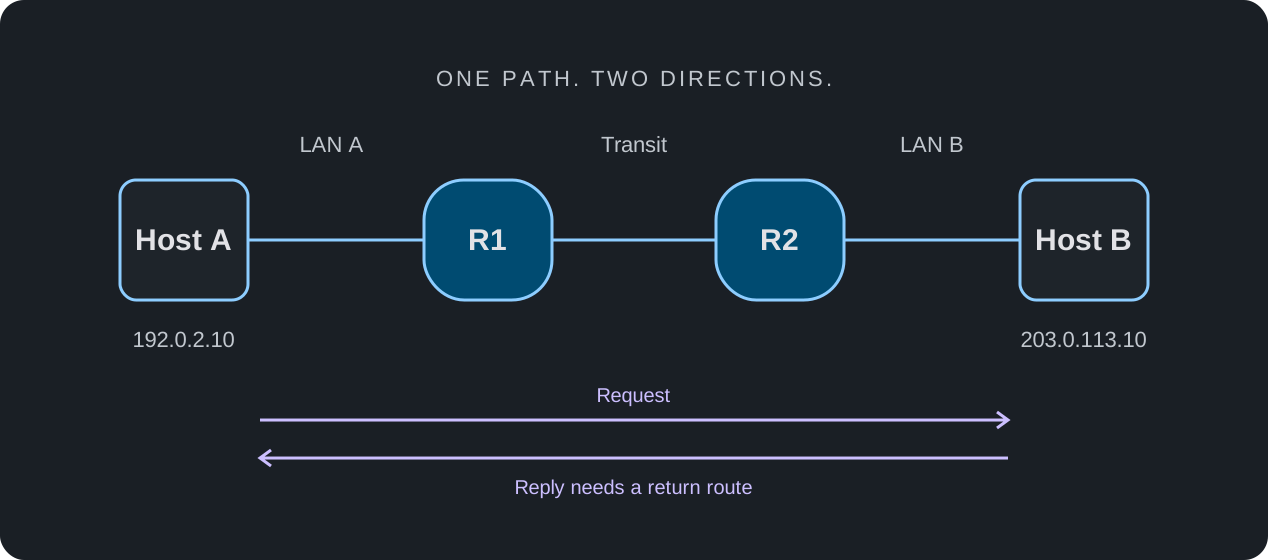
Connect Host A → R1 → R2 → Host B. Use the address plan below inside an isolated lab. These example ranges are reserved for documentation; they are not addresses for an Internet-facing deployment. The table specifies configuration intent so you can use the syntax appropriate to your selected profile.
| Node / interface | IPv4 address | Gateway or next hop |
|---|---|---|
| Host A | 192.0.2.10/24 | Gateway 192.0.2.1 |
| R1 → Host A | 192.0.2.1/24 | Directly connected LAN A |
| R1 → R2 | 198.51.100.1/30 | Peer 198.51.100.2 |
| R2 → R1 | 198.51.100.2/30 | Peer 198.51.100.1 |
| R2 → Host B | 203.0.113.1/24 | Directly connected LAN B |
| Host B | 203.0.113.10/24 | Gateway 203.0.113.1 |
Create and record a known baseline
Use an otherwise empty topology: no default routes, dynamic routing, translation, or filtering. Enable the intended interfaces and permit ICMP at the endpoints. On R1, configure a route for 203.0.113.0/24 via 198.51.100.2. On R2, configure a route for 192.0.2.0/24 via 198.51.100.1. Verify the installed routes rather than assuming accepted configuration is active.
A router selects a next hop using its forwarding information. An ICMP echo reply reverses the request's source and destination, so a successful exchange needs a usable return path as well. The two directions need not follow the same route in a larger network.
- Record the environment version, selected profiles, topology, addresses, and starting configurations.
- Inspect interface state and connected routes. Check the R1–R2 link before testing across the entire path.
- From each host, ping its local gateway. Resolve local addressing or link failures before proceeding.
- Check the two static routes in the routing tables. Wait for the intended state to settle, then test from both endpoints.
- Record the source, destination, probe count, and actual result. If an initial probe fails while neighbor state is established, record that and repeat consistently.
Host A
  ping 192.0.2.1
  ping 203.0.113.10

Host B
  ping 203.0.113.1
ping 192.0.2.10Remove one route and predict the failure
Remove only R2's route to 192.0.2.0/24. Confirm that neither a default route nor another matching route provides a substitute. Leave the interfaces, host gateways, and R1 route unchanged. Inspect the resulting table before repeating the same probes.
In this setup, Host A's request may still reach Host B, while its reply has no route through R2 to Host A. A failed ping alone cannot tell you which direction broke. Use the route tables and, if available, packet or event inspection to explain the failure; treat unavailable diagnostics as a limitation.
| Probe | Baseline | R2 route removed | Route restored |
|---|---|---|---|
| Host A → local gateway | Echo reply | Echo reply | Echo reply |
| Host B → local gateway | Echo reply | Echo reply | Echo reply |
| Host A → Host B | Echo reply | No successful exchange | Echo reply |
| Host B → Host A | Echo reply | No successful exchange | Echo reply |
Restore the route and repeat
Restore the original R2 route, verify that it is installed, and repeat the same probes. A recovery test matters: it helps distinguish the intended fault from an unrelated change in the environment. If the result differs, inspect the actual state before changing another variable.
- Topology and starting configuration match the recorded baseline.
- The deliberate fault changes only one route.
- Local gateway checks remain successful while the remote exchange fails.
- Restoration returns the same probe set to its baseline behavior.
- The record includes actual output, an explanation of discrepancies, and unsupported checks.
Environment / version:
Device profiles:
Starting configuration reference:
Change applied:
Probe source and destination:
Expected result:
Observed result and output:
Route-table evidence:
Restoration result:
Limitations / unresolved differences:
State what the result establishes
A passing run supports a narrow conclusion about the tested routing and ICMP behavior in that environment. It does not establish application availability, firewall policy for other traffic, throughput, latency, exact appliance behavior, or readiness for production deployment.
As a next exercise, change the host gateway or a subnet mask instead of a route and predict which checks will fail. Keep each experiment separate. Extend to dynamic routing only after confirming protocol support and defining an explicit convergence observation method.