Two tests, two different questions
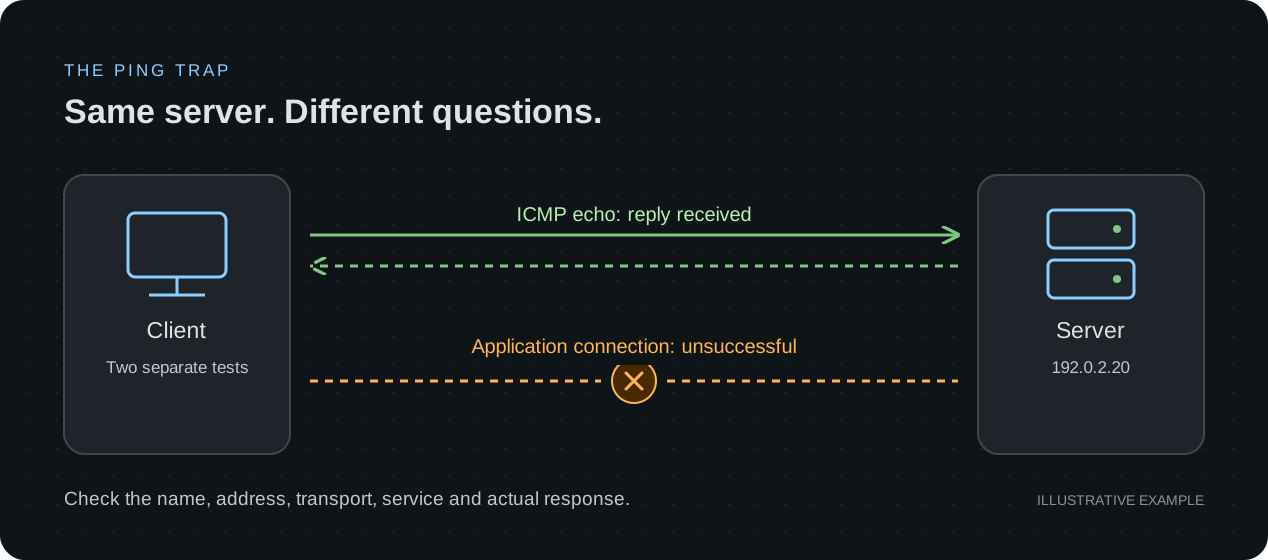
Picture a familiar support conversation. Someone cannot open an application. You ping the server, receive four replies, and announce that connectivity is fine. The application still fails. A second person restarts the service while a third starts changing routes. Soon, nobody knows which change affected the result.
Pause at the first conclusion. Ping asked whether a particular probe received a reply. The browser asked for a service, using a name, an address, a transport and an application exchange. A good diagnosis connects those observations instead of treating one as a verdict on the other.
Give a successful ping a precise meaning
In this IPv4 example, ping exchanges ICMP Echo Requests and Echo Replies. A matching reply is evidence that this exchange worked for the selected source and destination at that moment. It does not test whether a particular TCP port accepts connections, whether TLS succeeds, or whether the application returns useful content.
The reverse inference also fails: a ping timeout alone does not prove that the application is unavailable. A service can be reachable while ICMP is filtered or unanswered. Record the probe, its target and its result before deciding what to investigate next.
Make sure you are comparing the same destination
Suppose your successful probe targets 192.0.2.20. Does the application name actually lead the affected client to that address? Check the name resolution result, the address the client selected and the time of the test. A lookup result and an address remembered from yesterday can describe different destinations.
Keep the affected client in the experiment. A test from another computer may use a different resolver, route or policy. Where multiple addresses are available, note which address and IP version each test used. Cached answers can also explain why two clients disagree.
192.0.2.20 is a documentation address for this isolated example. Use the addressing assigned to your own lab.
Ask four smaller questions
For an HTTPS-over-TCP example, separate name resolution, connection establishment, TLS and the HTTP response. Each observation narrows the search. If your application uses a different transport, follow that transport rather than assuming every application uses TCP.
| Check | Question | What remains unproven |
|---|---|---|
| Name resolution | Which address did this client select? | Whether a service at that address is reachable |
| TCP connection | Can this client establish a connection to the intended port? | Whether TLS or an application request will succeed |
| TLS | Does the secure connection complete with the expected service identity? | Whether the application can fulfill the request |
| HTTP | Which response did the request receive? | Whether the full user workflow works |
Keep the error message; it changes the next step
“It failed” discards the most useful evidence. Keep the exact error and the point at which it occurred. A quick refusal, a timeout and a certificate error describe different observations, even if the browser displays an unavailable page for all three.
- Name lookup failure: investigate the client’s name-resolution result before treating the intended server as the tested destination.
- Connection refused: an active rejection reached the client. Inspect the intended listener and relevant policy; the message alone does not identify who generated the rejection.
- Connection timeout: the connection did not complete within the client’s limit. Investigate the path, policy and endpoint; a timeout alone does not identify a firewall as the cause.
- TLS or certificate failure: retain the precise error and check the intended hostname, service identity and trust configuration. Replacing the hostname with an IP address can change the test. Keep certificate verification enabled.
A 503 response is a clue, too
An HTTP 503 response means an HTTP responder reported that it could not handle the request. That is different evidence from never establishing a connection. The responder may be an intermediary, so the response does not prove that the intended application server is healthy.
Record the status, the requested name and path, and any useful response details. Then investigate the responding service and its dependencies. A successful ping cannot explain away an application error, and receiving some HTTP response does not establish that a login, upload or complete user journey works.
Build the contradiction on purpose
In an isolated environment with an ICMP-responsive host, a controllable TCP service and suitable inspection tools, establish a baseline: both the probe and the application operation succeed. Save the original settings. These are experiments to run and observe, not reported results from a nuLAB recording.
- Stop only the test service’s listener while leaving the host and network configuration unchanged. Repeat the same ping and connection attempt. Record whether replies continue and whether the connection is refused or times out; do not prefill the answer.
- Restore the listener and confirm the original application operation works again. Then change only the lab name-resolution entry. Compare a probe to the original literal address with what the application name now selects.
- Restore the name entry, account for the resolver cache, and repeat the original operation. Explain which observation isolated each fault and which possibilities the evidence did not rule out.
Affected client / test time: ___
Application name / selected address: ___
Transport / destination port: ___
ICMP result: ___
Connection / TLS / application result: ___
One change made: ___
Result after restoration: ___
What this proves / remaining question: ___
Practise the network part in nuLAB.ai
Start with a small topology and investigate supported addressing, link and routing behavior. Preserve a working baseline, introduce one fault and use the available observations to explain the result. Our network diagnosis tutorial shows a practical starting point for that habit.
Choose an environment that implements the particular checks you need. Device-profile and command coverage vary in nuLAB; this guide does not promise that every profile supports the DNS, TCP-service or TLS experiments above. Application behavior and hardware performance may need separate testing.
A strong final answer is specific: “This client received an echo reply from this address at this time; the application connection still failed at this step.” That gives the next person something useful to test.